Grim Notes
Aug 2, 2026
Organize your thoughts.
You're in the middle of a task and get a ping from a colleague.
Hey can you take a look at the rollback configs and make sure we're good there?
You pop open your notes.md file to add a reminder to yourself. You pause.
This file is a mess.
You don't have time to clean it up so you shake your head, jot down a new line, and move on. What you need is an apprentice.
Grim Notes is the fourth spell in Grimoire.
/grim-notes classifies your prompt into notes, todos, and resources, appends them into a file under today's day, then emits one at-a-glance viewport of the delta.
The Page
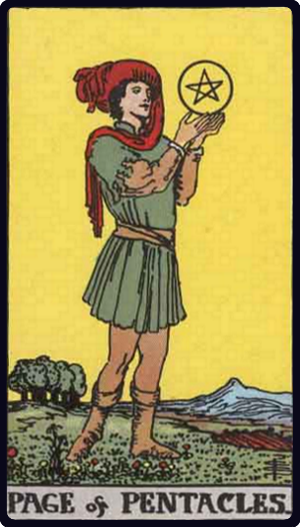
Filing is humble work.
The Page embodies learning, observation, and diligent practice; gathering ideas before they become official record.
The spell serves the same purpose: filing and sorting your notes and tasks, before they are edified into code.
The Page collects the raw material while the Craftsman refines it into history. Apprentice, followed by craftsman; a progression in the same suit.
Grim Notes is intentionally modest. It's a place to capture, file, and organize notes. It is not a full knowledge graph or a sprawling productivity suite.
Example: throneroom
A Grim Notes capture and status run on a local Throneroom workspace.
Command: /grim-notes noticed that throneroom flavor text leaked down into grimoire project skill - todo clean that up
Capture
notes/
╞══════════════════◆
│
└─≣ 2026-08.md
   └─≣ 2026-08-02
      ├─▲ +1 note
      └─▲ +1 todo
Command: /grim-notes
Status
notes/
╞══════════════════◆
│
└─≣ 2026-08.md
   ├─● 1 note
   └─● 1 todo
The notes file after the capture.
# 2026-08

## 2026-08-02

### Notes
- noticed that throneroom flavor text leaked down into grimoire project skill

### Todos
- [ ] clean that up (throneroom flavor text in grimoire project skill)
Other example runs found here.
What the spell does
Notes is not a substitute for a second brain. It is the apprentice at the desk: enough organization that capture does not become another chore.
Given a prompt or a bare cast, grim-notes organizes and emits one at-a-glance viewport in chat:
- Resolve the target - workspace root or named path.
- Classify - notes, todos, and resources from the paste (or skip to status when bare).
- Append the ledger - create or extend
notes/YYYY-MM.mdunder today's day. - Emit a report - delta or status viewport.
Note-taking is the spell. The viewport merely captures it.
Write the note. Let the Page file it away. Then decide what comes next.